Cost Plus & Construction Management

The construction software built for cost-plus builders

Claim from the actual invoices. Charge your margin. Show the client the detail - without showing them your position.

Most building software treats cost-plus as fixed price with the milestones deleted. In CortexPM it's a contract type of its own, with claims built from real supplier invoices instead of a milestone table you invented to make the software cooperate.

If this is what claim week looks like...

You export bills out of Xero and rebuild the cost schedule in a spreadsheet every single month

The client wants the invoices behind the number, so you email PDFs one at a time

Your margin isn't a line on anything, so it gets claimed late - or under-claimed and never noticed

An invoice made it onto two claims once, and you've been double-checking manually ever since

Your software makes you invent a milestone schedule just so it will let you raise a claim

That's not a discipline problem.

It's what happens when your software doesn't understand cost-plus.

Cost-plus isn't fixed price
with the milestones removed.

It's a different contract with different mechanics - and the software either models that or it makes you fake it.

On a fixed-price job the contract sum is the truth and cost is your private business. On a cost-plus job it's inverted:

The supplier invoice is the claim. Not a percentage of a milestone.

Your margin is a separate line that has to be claimed deliberately and tracked against what's left.

The client is entitled to the cost detail - but not to your forecast, your gain/loss, or your estimate markup.

Actuals can legitimately exceed the estimate. That's not an error to be blocked - it's a conversation to be documented.

Fixed-price software treats every one of those as an exception. So you work around it, and the workaround becomes the process.

In CortexPM

Cost-plus is a head contract setting: Invoice Based, alongside Milestone and Trade Breakdown.

Set it once on the contract and the whole system changes behaviour - how claims are raised, what the client portal will show, which report backs up the claim, and what happens when a cost code runs over.

No workaround to maintain. No fake milestones.

How a cost-plus claim actually gets built

Four steps. No spreadsheet in the middle of any of them.

1

Bills arrive and get coded

Supplier bills come in from Xero or get read straight off the PDF, then land against a cost code and a job. Purchase orders commit the cost before the invoice even shows up.

2

Pick the period's invoices

Set the claim period and CortexPM offers the eligible invoices for that job. Tick what's going in. Anything already sitting on another live claim is refused, not quietly duplicated.

3

Add the margin line

Your builder's margin or management fee goes on as its own line, with the amount already claimed and the amount remaining shown next to it - so you don't over-claim it or forget it.

4

Send it with the back-up

The claim goes out with the Cost Plus Invoice Schedule behind it - every invoice on the claim, broken down by the cost code it was allocated to. The client's first question is already answered.

Because the invoice is the claim, there's nothing to reconcile afterwards.

What you claimed and what you paid are the same records.

Open book. Not open everything.

The reason builders avoid giving clients a login on a cost-plus job is that most software shows too much. CortexPM decides what a client can see in one place - and internal columns never leave the building.
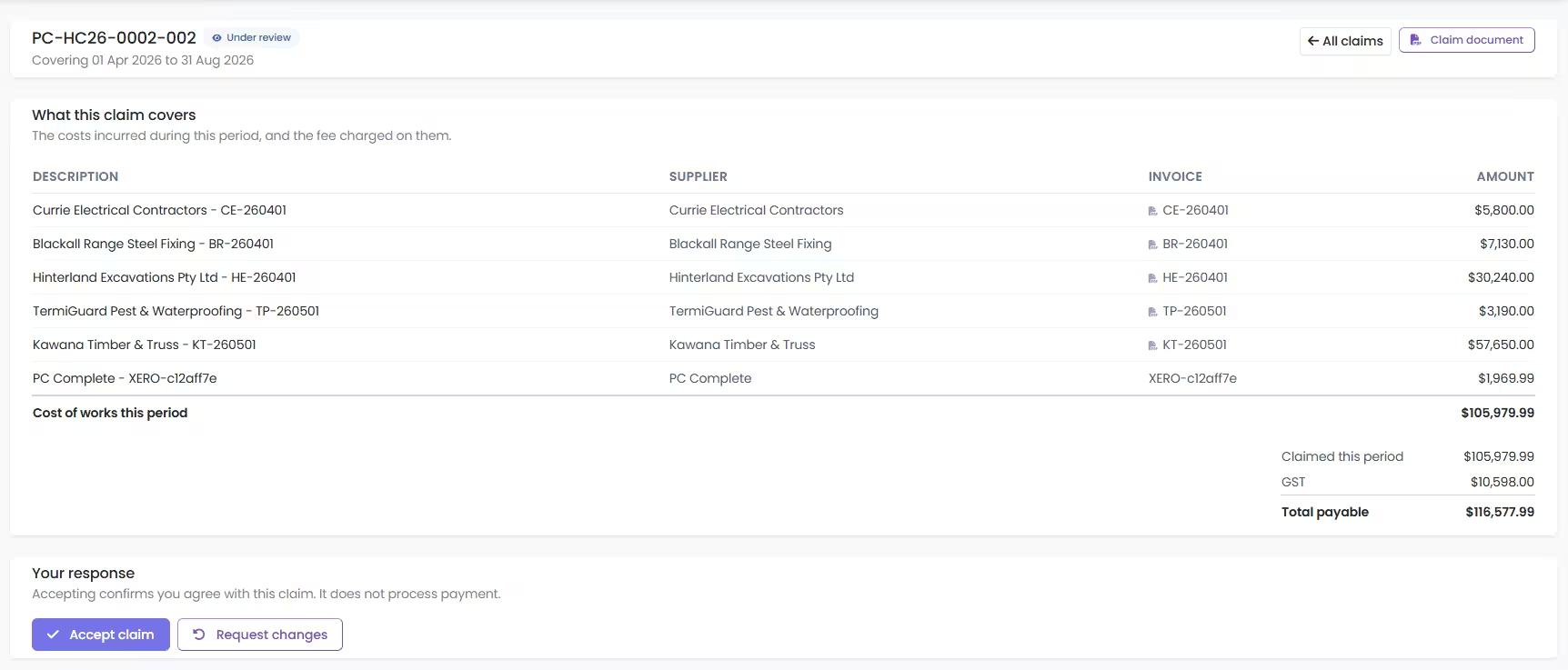
A cost-plus progress claim in the CortexPM client portal: every supplier invoice for the period with the builder's fee shown separately

The claim as the client actually sees it - every supplier invoice in the period, and the fee charged on them.

What open book actually means

The client is paying your suppliers' invoices, so they get to see them: cost by code against budget, the invoices behind each line, and what's been paid.

Margin and management-fee codes are shown separately from trade cost.

You set how open it is

  • Cost transparency - show the cost-by-code page at all
  • Supplier invoices - let them open the supplier's own invoice behind a line

Both off by default, set per project. Nothing is exposed because somebody forgot to turn it off.

Side by side

Running cost-plus in fixed-price software, versus running it in software that has the contract type.

Raising the claim

Fixed-price software

Invent a milestone or trade schedule so the claim screen will open, then key in a total you calculated somewhere else.

The claim is a transcription of a spreadsheet.

CortexPM

Set the period, tick the invoices, add the margin line. The claim is assembled from the actual cost records.

The claim is the invoices.

Back-up for the client

Fixed-price software

Export the bills, sort them, chase the ones coded to the wrong job, zip up the PDFs, email the lot and hope the totals agree.

CortexPM

The Cost Plus Invoice Schedule is generated from the same records the claim used.

  • Every invoice, by allocated cost code
  • Cost-recognised invoices only by default
  • Inc-GST entries normalised, so the totals hold
  • Same report, unapproved included, for internal audit

Your margin

Fixed-price software

Margin is baked into rates, or added as a manual line somebody has to remember. Nothing tells you how much of it you've actually billed.

CortexPM

Margin and management fee are their own cost codes with their own budget. Every claim shows what's been claimed and what's left to claim.

When a cost code runs over

Fixed-price software

Blocked as an over-claim, because the budget is treated as a hard ceiling. So you edit the budget to make the error go away, and lose the original number.

CortexPM

Allowed, because on a cost-plus job actuals legitimately exceed the estimate - and flagged for a variation so the overrun is documented rather than absorbed.

Built for Australian builders

Not US software with the dollar sign left alone.

GST handled properly

Every client-facing figure states its GST basis. Bills entered inclusive are normalised so a claim schedule can't overstate a cost code.

Real contract structures

HIA, MBA and AS4000 style head contracts, with retention, security and Australian payment claim practice built in rather than approximated.

Xero both directions

Supplier bills in, client claims out, allocated to jobs and cost codes. No re-keying, and no month-end reconciliation ritual.

Subbie claims and RCTI

Approve an incoming subcontractor claim and the supplier invoice is raised from it - including RCTI numbering where you have the agreement in place.

ABA batch payments

Pay the trades and suppliers behind a claim period as one ABA file to your bank, straight out of the same records.

Invoices read off the PDF

Supplier invoices are read and matched against purchase orders and budget lines, so coding is a review rather than an evening of data entry.

Is this you?

  • You run custom homes, large renovations or knockdown-rebuilds on cost-plus or CM terms
  • Your clients expect open-book detail and you'd rather give it to them properly than by email
  • You run some jobs cost-plus and some fixed price, and want one system for both
  • You're already in Xero and tired of it being the only place the truth lives

"Claim week used to be two days of exports and cross-checking. Now the claim comes off the invoices we've already coded, and the client gets the cost schedule with it. They stopped asking for back-up because it's already there."

- Morning View Constructions, QLD

Common questions

Can I run cost-plus and fixed-price jobs in the same system?

Yes. The claim type is set per head contract, so one job can be Invoice Based while the next is Milestone or Trade Breakdown. Cost codes, suppliers, purchase orders and the Xero connection are shared across all of them.

Do I have to give clients a portal login?

No. The open-book Costs page is off by default and has to be switched on per project. Plenty of builders run cost-plus in CortexPM and never turn it on - they just send the invoice schedule with the claim.

What stops an invoice being claimed twice?

The system does. If an invoice is already sitting on another claim for that contract that hasn't been finalised, it won't let you add it to a second one. You get told which claim it's on rather than finding out at reconciliation.

How is the builder's margin handled?

As its own cost code, flagged as margin or management fee, with a budget of its own. It goes on each claim as a separate line, and the claim screen shows how much has already been claimed and how much is left - so it's visible rather than something you reconstruct at the end.

We're mid-job. Can we move across without disrupting it?

That's the normal way in. Bring one live job across, run the next claim through CortexPM alongside your existing process, and compare the result before you commit anything else. See how Staged Onboarding works.

Does it replace Xero?

No, and it isn't trying to. Xero stays your accounting system. CortexPM is where the job lives - the estimate, the budget, the purchase orders, the claims - and the two stay in step so you're not maintaining the same numbers twice.

Bring us your next claim

Take a real cost-plus job and we'll build the claim with you - period, invoices, margin, back-up schedule.

Half an hour. You'll know inside the first ten minutes whether it fits how you run jobs.

No credit card required • Australian built • Cancel anytime

Dig deeper